Dottr vs PandaDoc: Proposal Builder vs Contract Teammate
Compare Dottr vs PandaDoc to find the right fit for contract review, risk detection, company playbooks, e-signatures, and contract follow-up.

A proposal can be ready to send, but what happens when the customer sends back a contract with unfamiliar clauses or changes the terms you agreed on? Someone still needs to review the document, decide which changes matter, and make sure the final agreement is ready to sign.
The stakes can be significant. According to World Commerce & Contracting's 2025 research, poor contract management erodes an average of 8.6% of expected contract value. For small businesses without dedicated legal support, missed terms and poorly managed agreements can affect revenue, margins, and business relationships.
This is where the difference between PandaDoc and Dottr matters. PandaDoc helps businesses create proposals, manage documents, and collect signatures. Dottr takes a different approach as an AI contract teammate, helping teams review agreements against their own standards, flag potential risks, fix the wording, and move contracts through signing and follow-up, all from the email thread the contract arrived in.
If you're looking for a PandaDoc alternative, the right choice depends on whether you mainly need a better way to create and send documents or more help managing the contract itself.
Key takeaways
- PandaDoc is built to create, send, track, and sign proposals, quotes, and other customer-facing documents.
- Dottr is an agentic, AI-native contract teammate. You say what you need and it does the work: drafting, reviewing, redlining, routing, chasing signatures, filing, and reminding you before renewals.
- Dottr drafts any contract from scratch or on your own template, then reviews every clause against your playbook, ranks the risks, and writes the fix into the document as a tracked change.
- Custom workflows and signing routes in Dottr are unlimited and set up by asking. There is no workflow builder, no drag-and-drop canvas, and no admin setup.
- Dottr works from your inbox. CC or forward dottr@dottr.io and the review comes back in the same thread, with no new tool to learn.
- Dottr learns from the positions you accept and reject, and lets you see and edit what it has learned.
- PandaDoc is priced per seat. Dottr is priced per contract, with unlimited users, e-signature included, and your first five contracts free.
- The right PandaDoc alternative depends on whether your priority is document creation or contract review and follow-through.
What Is PandaDoc?
PandaDoc is a document management platform that helps businesses create, send, track, and sign business documents. It supports workflows for proposals, quotes, contracts, and other customer-facing documents, keeping document preparation and signing in one place.
What PandaDoc Is Built to Do
PandaDoc helps businesses manage document workflows through features such as:
- Document creation: Build proposals, quotes, contracts, and other business documents using templates, a content library, and a drag-and-drop editor.
- Document sharing: Send documents to customers and other recipients for review.
- E-signatures: Collect electronic signatures without relying on paper-based processes.
- Document tracking: Monitor document activity and see when recipients view or interact with documents.
- Workflow management: Track progress, send reminders, and route documents for approval on higher plans.
In September 2026, PandaDoc also launched a contract lifecycle management (CLM) product that adds a contract repository, AI data extraction, AI search across stored contracts, and renewal alerts. That makes PandaDoc stronger at storing contracts once they are signed. What it still does not centre on is reading a contract before you sign it.
Where PandaDoc May Be Enough
PandaDoc may be a good fit if your main need is to create professional proposals, send documents to customers, collect signatures, and track their progress. For businesses with straightforward document workflows, it can provide the tools needed to move documents toward completion without adding a separate system.
However, if your main challenge is understanding unfamiliar contract terms, checking changes against your company's preferred positions, or managing what happens after review, you may need a tool with a stronger focus on contract review and ongoing follow-up.
What Is Dottr?
Dottr is an AI contract teammate that helps businesses draft, review, negotiate, sign, and keep track of their contracts. It is designed for teams that need contract support but don't have dedicated legal resources: founders, sales leads, finance, and operations.
Where PandaDoc starts with the document you want to send, Dottr starts with the contract you need to understand. It reads the agreement, tells you what matters, fixes what you want changed, gets it signed, and remembers it afterwards.
The bigger difference is how the work gets done. PandaDoc is software you operate: you build the template, configure the workflow, and push each document along. Dottr is agentic. You tell it the outcome you want in plain English, in an email or in the app, and it plans the steps and carries them out on its own, checking with you only before anything goes out.
Dottr vs PandaDoc: Side-by-Side Comparison
PandaDoc and Dottr support different parts of the contract workflow. PandaDoc focuses on creating, sending, tracking, and signing business documents. Dottr focuses on reviewing contracts against company standards, fixing the risks it finds, and managing every step that follows.
| What you need | Dottr | PandaDoc |
|---|---|---|
| Built for | Teams without in-house legal who need contracts reviewed, signed, and tracked | Sales teams sending proposals, quotes, and customer documents |
| Where the work happens | Your inbox: CC or forward dottr@dottr.io from Gmail, Outlook, Apple Mail, or your phone | The PandaDoc app and its CRM integrations |
| Setup | None. If you can CC an email, you are set up | Seats, templates, and integrations to configure |
| How the work gets done | Agentic: say the outcome, and Dottr plans and runs every step on its own | You drive each step in the app, with an AI assistant for writing and data extraction |
| Proposals, quotes, and pricing tables | Not its focus | Core capability |
| Contract drafting | Full-fledged drafting, from scratch from a sentence or deal notes, or on your own template, in any jurisdiction | Templates, content library, and AI assistant |
| Clause-level risk review | Every clause checked, risks ranked by severity, explained in plain language | Not a core capability |
| Review against your company playbook | Preset playbooks or your own rulebook, as many as you need | Not a core capability |
| Fix the risky wording | Replacement wording written into the clause as a tracked change you accept or reject | Edit the document yourself |
| Negotiation rounds | Every round returned as a tracked Word document with a changelog | Comments and edits in the document |
| Compare versions | See exactly what moved between any two drafts | Document version history |
| Learns your positions | Learns from every accept and reject, in a memory you can see, edit, or delete | Not a core capability |
| E-signature | Included in every contract, with an audit trail and certificate of completion | Core capability |
| How signers sign | Signing link, or a reply to the email with their full name | Signing link |
| Signer follow-up | Autonomous, on your cadence and in your wording, until the last signer is done | Automatic reminders |
| Custom workflows | Unlimited. Describe the workflow in plain English and Dottr builds and runs it, no setup or drag-and-drop | Approval workflows on the Business plan and above, configured in settings |
| Signing routing | Unlimited. Signing order, approvers, CCs, and who gets the signed copy, all set by asking | Signing order and recipient roles set up per document |
| Repository and search | Every contract searchable, and every answer cites the clause it came from | Repository and AI search in PandaDoc CLM |
| Renewal reminders | Automatic, timed to the notice deadline rather than the renewal date | AI renewal alerts in PandaDoc CLM |
| Pricing model | Per contract: first 5 free, then $1 a contract with everything included | Per seat: $19 a month (Starter) or $49 (Business), billed annually |
| Users | Unlimited, never billed | Every seat is billed |
PandaDoc prices are the published list prices on pandadoc.com, billed annually, checked in October 2026. Enterprise plans for both products are quoted.
Dottr's Agentic Workflows: Say What You Need, Dottr Runs It
The biggest gap between the two products is not a feature. It is who does the work.
In PandaDoc, a workflow is something you build. You set up approval rules in settings, assign signing order and recipient roles to each document, and come back to check on progress. In Dottr, a workflow is something you ask for. Dottr is AI-native from the ground up, so you describe the outcome in plain English and it turns that into a plan, runs each step on its own, and tells you when it's done.
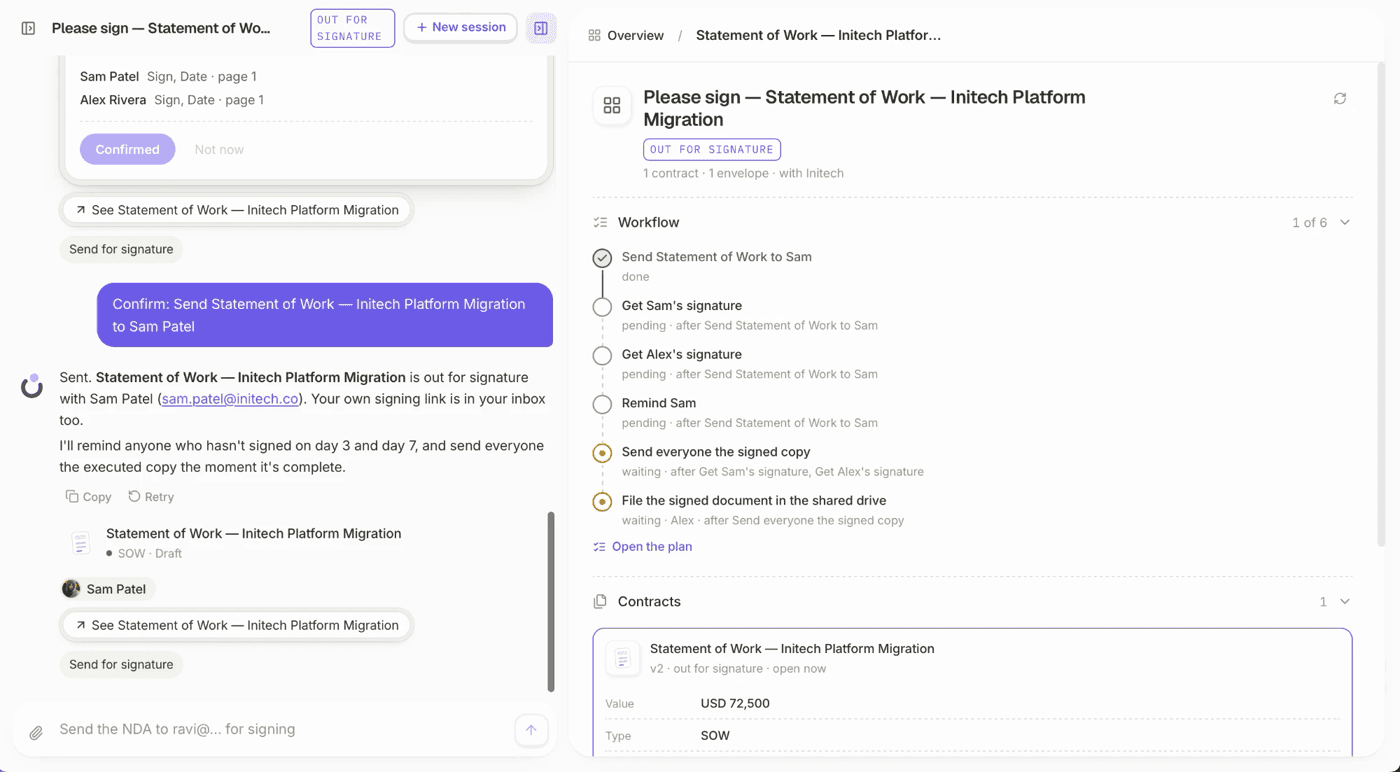
"Send the Initech SOW to Sam and Alex for signature. Get finance to approve it first, copy our CEO, remind them every three days, and file the signed copy in the shared drive."
That one sentence is the whole setup. Dottr builds the workflow, sends the contract in the right order, waits for the approval, chases each signer on schedule, shares the executed copy with everyone, and files it. You can see every step in the plan, and change any of it by saying so.
No Builder, No Setup, No Limits
There is no workflow designer to learn, no drag-and-drop canvas, and no admin who has to configure routing rules before anyone can send a contract. Custom workflows and signing routes are unlimited on every workspace and included in the price of the contract. If the next deal needs a different approver or a different signing order, you just say so.
What Dottr Does on Its Own
Once you have told Dottr what you want, it works through the contract largely without you:
- Drafts the contract from scratch or on your own template, from a sentence or your deal notes.
- Reviews every contract the moment it is CC'd or forwarded, against the right playbook.
- Redlines the risky clauses as tracked changes and returns every negotiation round with a changelog.
- Routes the contract for approval and signature in the order you described.
- Chases each signer on your cadence and in your wording until the last signature is in.
- Shares and files the executed copy with everyone who needs it.
- Remembers every date and reminds you before a renewal or notice deadline passes.
- Answers questions across all of your contracts, with the clause behind every answer.
You stay in control throughout. Dottr asks before anything leaves your hands, so nothing is sent, signed, or changed in the contract until you approve it.
Where Dottr Pulls Ahead of PandaDoc
The table shows the shape of it. Here is what each of those differences looks like in practice.
1. It Drafts the Contract, From Scratch or on Your Template
Dottr has full-fledged contract drafting built in. Tell it the deal in a sentence or paste your notes, and it drafts the complete agreement from scratch, in any jurisdiction. Or upload the templates you already use, and Dottr drafts in your language and on your terms. Change a fee, a party, or a term and every clause it touches updates with it.
PandaDoc is excellent at assembling documents from templates and a content library. Dottr writes the contract itself, then reviews its own draft against your playbook before it goes out.
2. It Reads Every Clause, Not Just the Signature Block
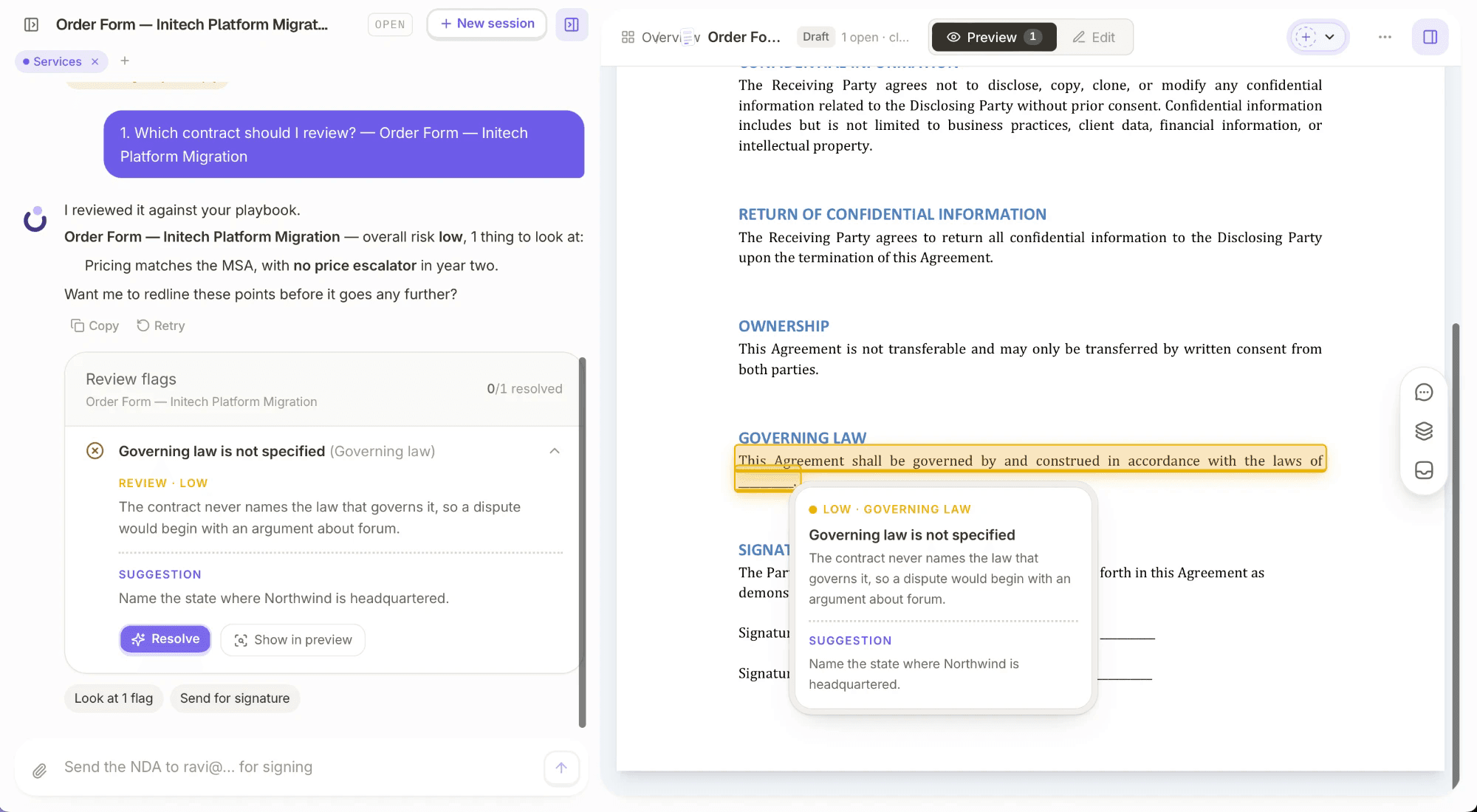
PandaDoc tells you when a document has been opened. Dottr tells you what is inside it. Every contract Dottr receives gets a full review: auto-renewal and notice periods, liability caps, indemnities, payment terms, termination rights, scope, IP ownership, confidentiality, governing law, price escalators, and assignment on change of control.
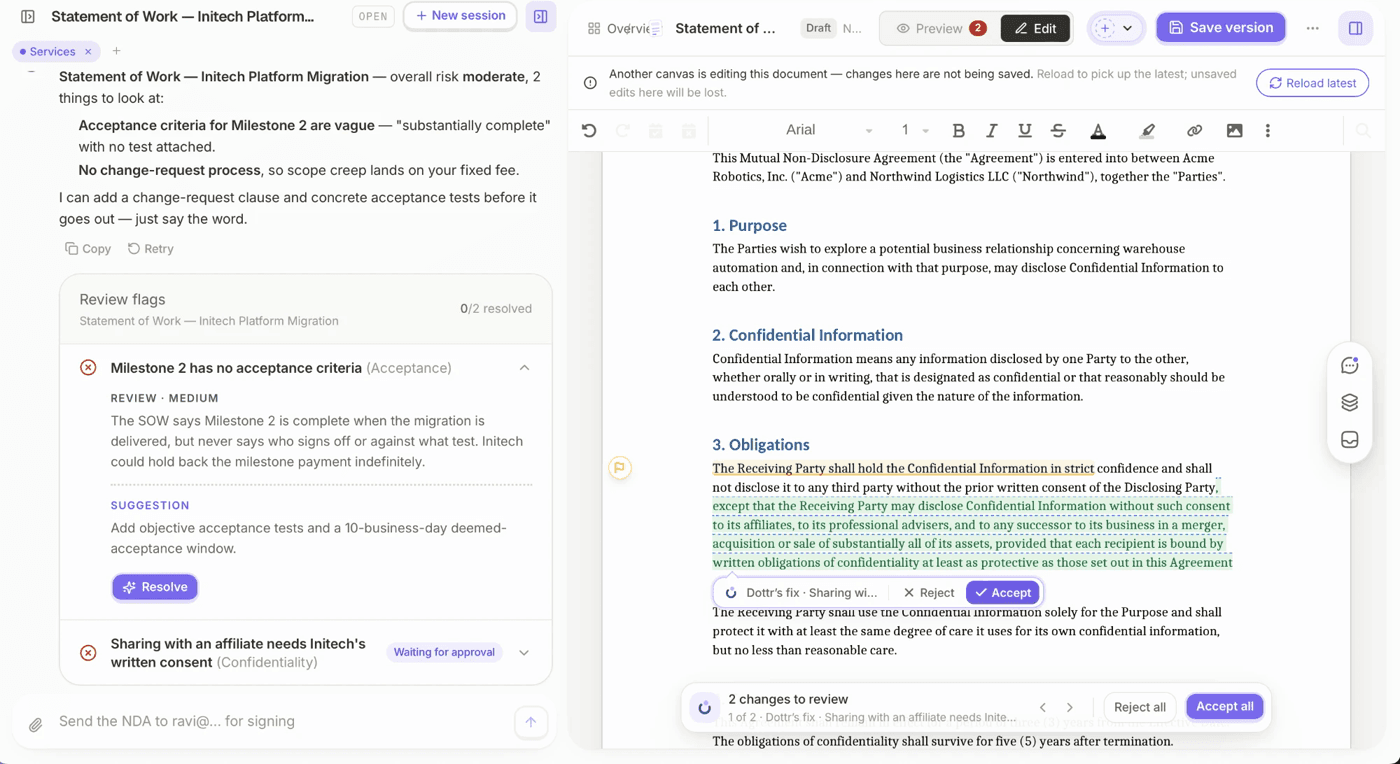
Each risk comes back as a flag ranked by severity, with a plain-language explanation of what it means for your business and a suggested fix. Anything that is standard is said to be standard, so you spend your time on the two clauses that matter rather than the forty that don't.
You can also use this contract review checklist covering 12 clauses to check before signing to see what a thorough review should cover.
3. It Reviews Against Your Rules, Not Generic Ones
A risk is only a risk relative to what your business accepts. Dottr checks each contract against a playbook, a set of rules for that type of agreement. Start from a preset playbook for NDAs, MSAs, SOWs, contractor and employment agreements, or upload your own company rulebook. You can have as many playbooks as you need, and Dottr applies the right one to each contract.
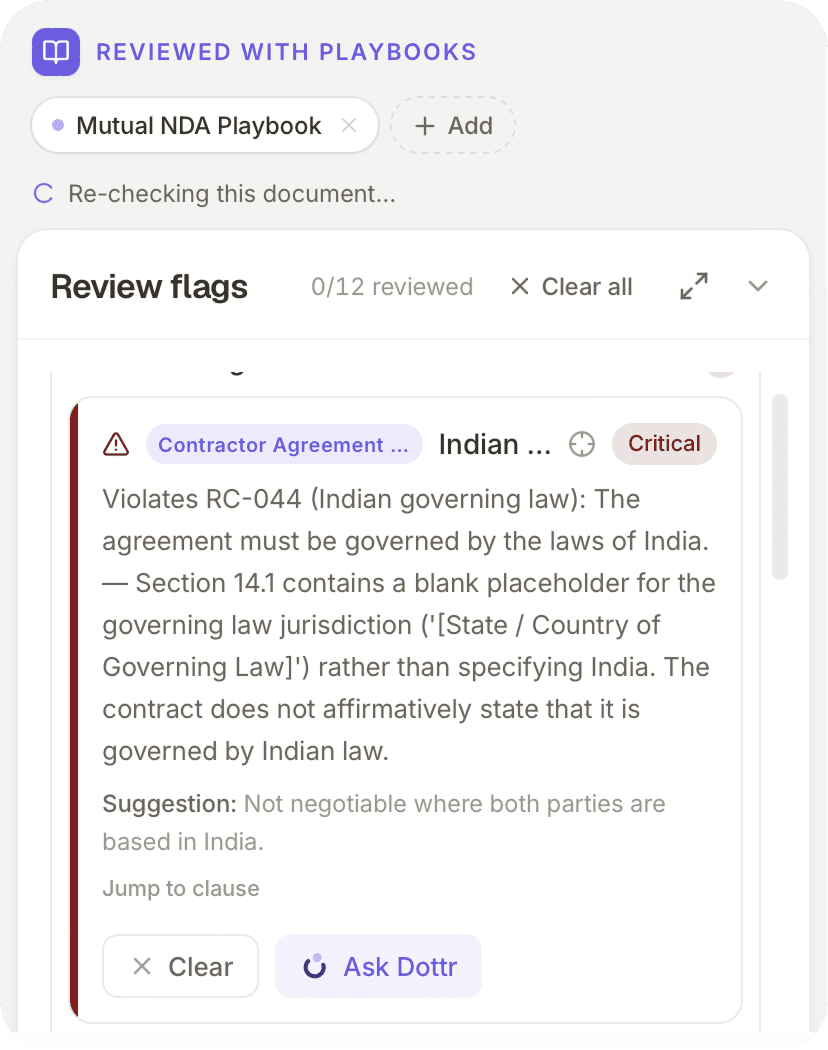
When a clause breaks one of your rules, the flag names the rule it broke, so the review reads like your own policy applied consistently, not an AI's opinion.
4. It Writes the Fix Into the Contract
Spotting a problem is half the job. In PandaDoc, changing the wording is still yours to do. In Dottr, resolving a flag writes the replacement wording into the exact clause it came from, as a tracked change the other side can accept or reject. Nothing changes until you approve it, and rejecting a change puts the clause back exactly as it was.
The same works across a negotiation. Add Dottr to the email thread with the other side and every version exchanged comes back as a tracked Word document with a changelog, so you always know what moved between rounds, including the changes nobody mentioned.
5. It Works Where the Contract Arrives
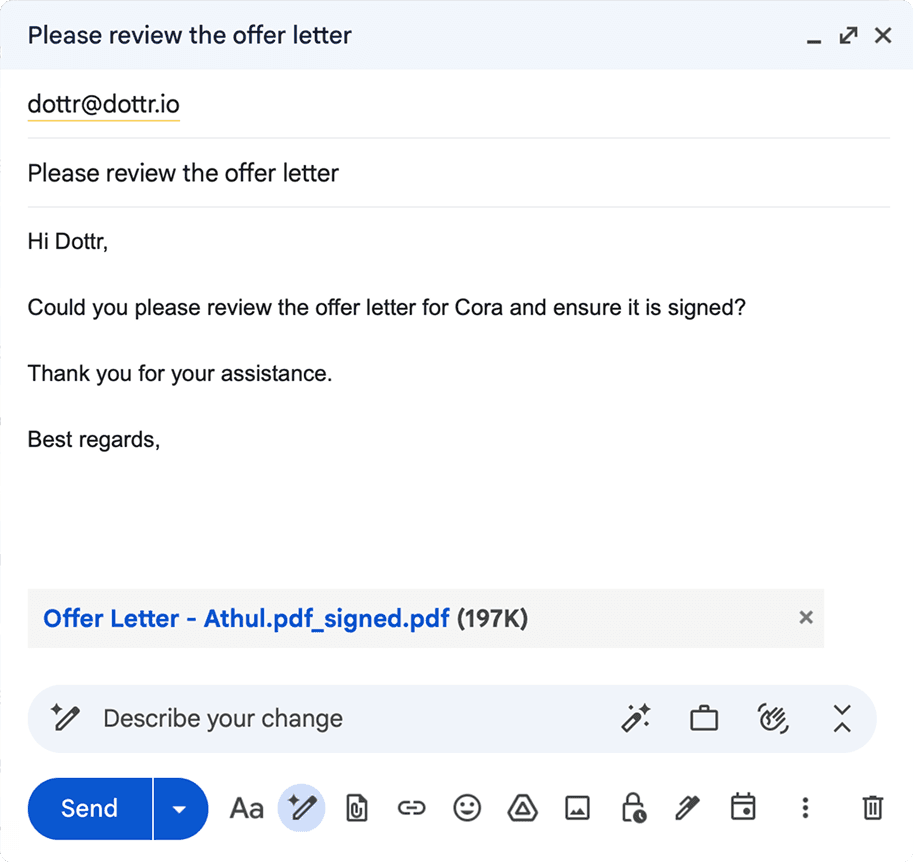
Most contracts don't arrive in a document platform. They arrive in an email. Dottr is an email address: CC or forward dottr@dottr.io on the thread, from Gmail, Outlook, Apple Mail, or your phone, and the review comes back in the same thread. There is nothing to install and no seats to set up. For a confidential contract, BCC Dottr and it will not appear in the visible thread.
The other side never needs an account either. They can sign from a link, or simply reply to the email with their full name.
6. It Learns Your Positions and Shows You What It Learned
If similar contracts come through regularly, your team keeps answering the same questions: Which liability terms are acceptable? What payment terms should you push back on? Which clauses need approval?
Dottr learns from every flag you accept or reject and applies those positions in future reviews. Net 45 passes quietly if you have always accepted it; net 60 gets flagged if you never have. Unlike a black box, the memory is yours to inspect: you can see each position Dottr has learned, where it came from, and how often it appeared, and edit or delete anything that is wrong.
7. It Chases the Signature Until It's Done
Once the terms are settled, Dottr sends the contract for signature along the route you asked for: who approves first, who signs in what order, who is copied, and where the signed document is filed. Signing routes are unlimited and set by asking, with no per-document configuration. You decide how often Dottr follows up and in what words, and it keeps going on its own until the last signer is done. Everyone gets the executed copy the moment it is complete, with an audit trail and certificate of completion.
8. It Remembers the Contract After It's Signed
Every contract that passes through Dottr goes into a searchable record with its versions, parties, signers, key dates, and review history. Ask a question in plain English, such as what renews next month or which customers have uncapped liability, and the answer links to the exact clause it came from, so you can check it in one click.
9. It Warns You Before a Contract Renews
Auto-renewals are where small businesses quietly lose money: a tool nobody uses renews for another year, or a discount runs out without anyone renegotiating. Dottr reads the renewal and notice terms out of every contract and sends renewal reminders automatically, with no dates to enter and no calendar to maintain.
The reminder is timed to the notice deadline, the renewal date minus the notice period, because that is the last day you can still act. Dottr tells you before the auto-renewal does.
10. It Costs Less as Your Team Grows
PandaDoc charges for every seat, whether that person sends one document a year or a hundred. Dottr charges for the contract instead. Your first five contracts are free, then each one costs a dollar, and that dollar covers drafting, review, negotiation, signing, and download. Users are never billed, so finance, operations, and your outside counsel can all sit in the same workspace for free.
For a sense of scale: a five-person team on PandaDoc Business pays $2,940 a year at the annual rate. The same team closing 20 contracts a month on Dottr would spend $216 a year.
PandaDoc charges for the people who use it. Dottr charges for the contracts it handles, and lets everyone else in for free.
Dottr also does not use your contracts to train AI models, on any plan.
When a PandaDoc Alternative Makes More Sense
PandaDoc can handle document creation and signing. But if your main challenge is reviewing contract terms, checking changes, and keeping agreements on track, you may need a tool built around those tasks.
Your Contract Needs More Than a Signature
A proposal may be ready to send, but a negotiated contract can bring new clauses, revised terms, and questions about what your business can accept. Before signing, someone needs to review those changes, identify potential risks, and decide what needs to be negotiated. Dottr does that review and drafts the counter-wording for you.
For a closer look at what to check before signing, read our guide to AI contract review for small businesses.
Your Team Has No Dedicated Legal Reviewer
In a small business, contract review often falls to a founder, sales lead, or operations manager who already has other responsibilities. Without dedicated legal support, it can be difficult to assess unfamiliar clauses or check every agreement consistently.
Dottr helps these teams review contracts against a playbook and understand potential risks in plain language.
Most of Your Contracts Arrive on the Other Side's Paper
PandaDoc is at its best when you are sending your own templates. When the customer, supplier, or partner sends their contract instead, the work is reading it, not building it. Dottr is built for that moment, and it handles inbound paper the same way it handles your own.
You Don't Want to Pay for Seats
If several people touch contracts occasionally, per-seat pricing means paying for licences most of them barely use. Per-contract pricing lets the whole team in and charges only for the work done.
PandaDoc or Dottr: Which One Fits Your Workflow?
The right choice depends on where your team needs the most help.
PandaDoc May Be the Better Fit If:
- Your main priority is creating and sending proposals, quotes, or pricing documents.
- You need CPQ, deal rooms, web forms, bulk send, or deep CRM integrations.
- You mostly send your own templates and the terms rarely change.
- Your biggest bottleneck is collecting signatures and tracking document views.
Dottr May Be the Better Fit If:
- You want an AI teammate that does the contract work, not another tool your team has to operate.
- You'd rather describe a workflow in a sentence than build one in a settings screen.
- You need contracts drafted from scratch or on your own templates, not just assembled.
- Your team needs help reviewing contracts and understanding potential risks.
- You want contract reviews based on your company's rules and preferred positions.
- You want risky clauses fixed as tracked changes, not just pointed out.
- You negotiate contracts over email and want every round tracked.
- You need help moving agreements from review through signing and follow-up.
- You want pricing that doesn't grow with every person you add.
You can go for PandaDoc if your priority is document creation and signing. But if you need more help understanding contract risks, applying your company's rules, and keeping agreements moving from review to signature, Dottr is the better fit.
Frequently Asked Questions
Yes, for contracts. Dottr covers the contract side of PandaDoc, including drafting, sending for signature, reminders, and a searchable record, and adds clause-level review, playbooks, tracked-change fixes, negotiation tracking, and agentic workflows that run themselves. It is not built for proposals, quotes, or pricing tables.
It means Dottr takes actions, not just answers questions. You describe what you want, such as "draft an NDA with Acme and get it signed by Friday", and Dottr plans the steps, drafts, reviews, sends, chases, and files on its own. It asks for your approval before anything goes out.
No. There is no workflow builder or drag-and-drop editor. Describe the approvals, signing order, reminders, and filing you want in plain English, and Dottr sets up the workflow for you. Custom workflows and signing routes are unlimited on every workspace.
Yes. E-signature is included in every contract at no extra cost, however many people need to sign. Every signed document comes with an audit trail and a certificate of completion.
Yes. Some teams keep PandaDoc for proposals and quotes, and CC Dottr whenever a contract comes back with changes that need review.
No. Dottr is not a law firm and does not provide legal advice. It helps you understand contracts, identify common risks, and prepare the changes you want to make.
Conclusion: Choose a Tool That Does More Than Collect Signatures
Creating and signing documents is one part of contract management. Understanding the terms, spotting risks, fixing the wording, and keeping agreements on track can take just as much effort.
PandaDoc is a strong option for businesses that need to create, send, and sign documents. But if your team wants contracts drafted, reviewed against company-specific rules, and followed through to signature and renewal by an AI teammate that runs the workflow itself, Dottr offers a more contract-focused approach, at a price that doesn't grow with your headcount.
Want to spend less time reviewing contracts manually? Try Dottr free on your next five contracts and see how an AI contract teammate can help your team review agreements, flag risks, and keep contracts moving.
Try it on a real contract
CC Dottr on the next one that lands.
It comes back reviewed against your playbook, with every risk flagged in plain English, and then it chases the signatures for you.