AI Contract Review for Small Business: What to Check Before You Sign
What to check in an AI contract review before you sign: the key clauses, how to get better results, and when to involve a lawyer.

A contract lands in your inbox, and you need to sign it soon. But before you do, you want to know what you are actually agreeing to.
For many small businesses, there is no in-house legal team to send every agreement to. A founder, operations lead, sales leader, or business owner often has to review contracts themselves. And getting the contract wrong can have consequences long after the signature is added.
According to research from World Commerce & Contracting, poor contract management and post-signature inefficiencies can erode nearly 9% of annual contract value on average. More recent WorldCC research focused on procurement contracts puts average post-signature value leakage at 11%.
This is where AI contract review can help. AI can summarize a contract, explain complex clauses in plain English, and flag terms that may deserve a closer look. But getting an AI-generated summary is not the same as knowing whether a contract is ready to sign.
In this guide, we'll walk through the key things to check during an AI contract review before you sign, how to get more useful results from AI, and what should happen once the review is complete.
Key takeaways
- AI can help you understand and review contracts, but important findings still need verification.
- Check key terms such as payment, liability, renewal, termination, and ongoing obligations before signing.
- Give AI context about your role, priorities, and preferred contract positions for a more useful review.
- Some contracts still require a lawyer's expertise.
- Contract review is only the first step. Tools like Dottr help move contracts from review to signing and beyond.
What Can AI Contract Review Help You Check?
AI contract review can help you get through an agreement faster by pulling out the information that deserves your attention. Instead of reading every clause without knowing where the important terms are, you can use AI to summarize the contract, explain unfamiliar language, and flag provisions worth a closer look.
For example, an AI review can help you check:
- What you are agreeing to: Key obligations, scope, deliverables, and responsibilities.
- What could affect your money: Payment terms, late fees, liability, indemnity, and other financial commitments.
- What could affect the future of the agreement: Renewal terms, notice periods, termination rights, and important deadlines.
- What may need clarification or negotiation: Unusual obligations, missing protections, or terms that do not align with your business position.
The key is to treat AI as a way to focus your review, not as a substitute for reading or verifying the contract. AI can help surface what deserves attention, but you still need to verify every crucial finding against the actual agreement and decide what they mean for your business.
7 Things to Check Before Signing a Contract
An AI contract review can help surface important information, but you still need to know which parts of the agreement deserve the closest attention. Before signing, check these seven areas.
1. Scope and Deliverables
The first thing you need to consider is: what exactly are you agreeing to provide or receive?
Start by checking whether the contract clearly defines the scope of work, deliverables, responsibilities, timelines, and anything that falls outside the agreement. Vague language can create room for different interpretations later, particularly when one party expects work or services that the other party did not intend to provide.
Ask AI to summarize the obligations of both parties and flag anything that appears unclear, open-ended, or undefined.
2. Payment Terms
Check how much is being paid, when payment is due, and what conditions could affect it.
Look for payment schedules, invoicing requirements, late-payment provisions, refunds, credits, fees, and any terms that could delay or reduce payment. Make sure the commercial terms you agreed to during discussions are actually reflected in the contract.
A useful AI review can pull these terms into one place so you can see your financial obligations or expected revenue without searching through the entire document.
3. Liability and Indemnity
These clauses can determine who bears the financial consequences if something goes wrong.
Check whether liability is capped, whether there are exceptions to that cap, and what you may be required to cover under an indemnity provision. AI can help explain these clauses in plain English, but their impact depends heavily on your business, role in the agreement, and the deal itself.
If the potential exposure is significant or unclear, this may be an area where legal advice is worth considering.
4. Renewal and Termination
Check how long the agreement lasts, whether it renews automatically, and how either party can end it.
Pay particular attention to notice periods and cancel-by dates. The renewal date is not always the date that matters most. In an auto-renewing contract, you may need to give notice weeks or months before the renewal date if you do not want the agreement to continue.
Also check for termination rights, cure periods, early termination conditions, and any obligations that continue after the contract ends.
5. Intellectual Property and Confidentiality
Make sure you understand who owns the work, data, or other intellectual property covered by the agreement.
This can be particularly important for agencies, consultants, developers, and service providers. Check whether the contract transfers ownership, grants usage rights, or places restrictions on how work or information can be used.
Also review confidentiality obligations and make sure you understand what information must be protected and what those obligations require from your business.
6. Ongoing Obligations and Important Deadlines
Some of the most important commitments in a contract do not happen at signing.
Look for obligations that require action later, such as reporting requirements, approval processes, insurance obligations, notification requirements, security commitments, or specific deadlines.
AI can help extract these obligations and dates, but they still need to be verified against the actual contract. Before signing, ask yourself: what will we need to remember and do after this agreement is executed?
7. Changes From the Previous Version
If the contract has gone through negotiation, do not assume the latest version only contains the changes you discussed.
Check what changed between versions, including payment terms, scope, liability language, renewal provisions, and any new clauses. A small change in wording can sometimes change what the contract requires.
This is where AI-assisted version comparison can be particularly useful. Rather than rereading the entire agreement from scratch, you can focus on what actually changed and confirm that the final version reflects what both sides agreed to.
Once you have checked these areas, the next step is to make sure AI has enough context to review the contract based on what matters to your business, rather than simply identifying a generic list of potentially risky clauses.
How to Get a More Useful AI Contract Review
The quality of an AI contract review depends partly on the context you give it. Simply uploading an agreement and asking, "Is this contract safe?" may produce a broad list of issues, but it may not tell you which ones actually matter to your business.
A more useful review starts with three things.
Tell AI What Your Role Is
The same clause can have very different implications depending on which side of the agreement you are on.
Tell the AI whether you are the customer, supplier, employer, contractor, service provider, or another party. This helps frame the review around the obligations and risks relevant to your position.
Tell AI What Matters to Your Business
You may have specific terms that matter more than others. For example, you might have limits on the liability you are willing to accept, preferred payment terms, or requirements around intellectual property and termination.
Giving AI these priorities can help it focus the review on what you are actually trying to protect rather than simply identifying a generic list of potentially risky clauses.
Give AI Your Preferred Contract Positions
If you regularly handle similar contracts, explaining your preferences every time can become repetitive. This is where a contract playbook can help.
A playbook is a set of rules and instructions that guide the contract review based on your company's standards. For example, it can tell the AI which terms are acceptable, which ones need to be flagged, and where you may want to negotiate.
Dottr lets you choose a preset playbook for different contract types or upload your own company-specific rulebook. This gives the review context around your standards and company rules, which can then be applied to similar contracts you handle in the future.
The goal is not simply to ask AI which clauses are "risky." It is to help it identify which terms may be risky or unacceptable for your business and why.
Don't Stop at the AI Review
An AI review can help you understand a contract and identify terms that deserve attention. But finding an issue is only one part of getting a contract done.
Once the review is complete, someone still needs to decide what to do with the findings. That may mean negotiating a clause, making changes to the document, or getting clarification from the other party. You also need to make sure the final version reflects the agreed changes before it is sent for signature.
And the work does not necessarily end once the contract is signed. The agreement may contain renewal deadlines, notice periods, ongoing obligations, or other dates that need to be remembered later.
This is where the difference between AI contract review and contract workflow becomes important. An AI tool can help you understand what is in the document, but the contract still has to move from review to a final version, through signing, and into a record you can find and refer to later.
For small businesses, this work can easily end up spread across emails, document folders, e-signature tools, and spreadsheets. Dottr is an AI-native contract management agent designed to connect those steps and keep the contract moving from review to signing and beyond. This means the information identified during review stays connected to the work that follows.
A useful AI contract review should therefore be the beginning of the process, not the point where the process ends.
When Should You Still Ask a Lawyer?
AI can help you understand a contract and identify issues worth a closer look, but some situations require legal judgment that goes beyond an AI review.
Consider involving a lawyer when:
- The contract is high-stakes. The financial, legal, or business consequences of getting it wrong are significant.
- The agreement is specialized or complex. You may need expertise in a specific area rather than a general explanation of what the contract says.
- You do not understand the impact of a clause. AI may explain a provision in plain English, but you may still need legal advice on what accepting it means for your business.
- A flagged issue could create significant exposure. If the potential consequences are unclear or substantial, it is worth getting professional advice before signing.
The challenge for small businesses is that traditional legal review can be expensive. Lawyers are often billed by the hour, which can make the final cost difficult to predict. For a smaller contract, the legal bill can sometimes feel disproportionate to the value of the agreement itself.
Dottr provides a middle ground through its Talk to a Real Lawyer option. When additional legal expertise is needed, users can request a lawyer review and pass along the contract with the AI review, giving the lawyer context on the issues already identified. A fixed-price review can also make the cost clearer than an open-ended hourly engagement.
The goal is not to replace lawyers with AI. It is to use AI for the work it can do quickly, and bring in legal expertise when the contract or the risk calls for it.
AI Contract Review Checklist
Before signing a contract, use this checklist to make sure the AI review has covered the terms that could matter most to your business.
- Scope and deliverables: Is it clear what each party is expected to provide or do?
- Payment terms: Are the amount, payment schedule, invoicing requirements, and late-payment terms correct?
- Liability and indemnity: Do you understand what financial exposure your business could take on?
- Renewal and termination: Does the contract renew automatically, and what is the actual notice or cancel-by date?
- Intellectual property and confidentiality: Do you understand who owns the work, data, or intellectual property and what information must remain confidential?
- Ongoing obligations: Are there reporting, notification, security, insurance, or other requirements you will need to meet after signing?
- Changes from previous versions: Have you checked that the final draft includes the changes you agreed to?
- Final version and signers: Are you sending the correct version, and will the right people sign it?
This checklist can help you focus an AI contract review on the areas that deserve the closest attention. Before signing, however, important AI findings should always be checked against the actual agreement, particularly when a clause could create significant legal or financial consequences.

Free download
Get AI prompts to review your small business contracts better
Not sure what to ask AI when reviewing a contract? Download our practical set of AI contract review prompts for small businesses, to help you check key clauses, spot potential issues, understand obligations, and ask better follow-up questions.
Download the guide
How to Review Contracts Using Dottr
Dottr is designed to make AI contract review part of a connected workflow rather than a separate task.
1. Bring the Contract Into Dottr
Start by adding the contract to Dottr from your workspace or by including dottr@dottr.io in the relevant email thread.
2. Review It Against the Right Standards
Dottr automatically applies the appropriate playbook when reviewing a contract, so you don't need to choose one yourself. The review follows the rules and instructions relevant to that type of agreement. You can also add company-specific rules to give Dottr additional context around how your business handles contracts.
This helps the review focus on your business's standards rather than relying only on a generic list of potentially risky clauses.
3. Review the Issues That Need Attention
Dottr helps surface and prioritize contract issues so you can focus on the terms that need a decision, clarification, or change.
You can review the flagged issues, understand why they matter, and use the findings to decide what to accept, negotiate, or escalate.
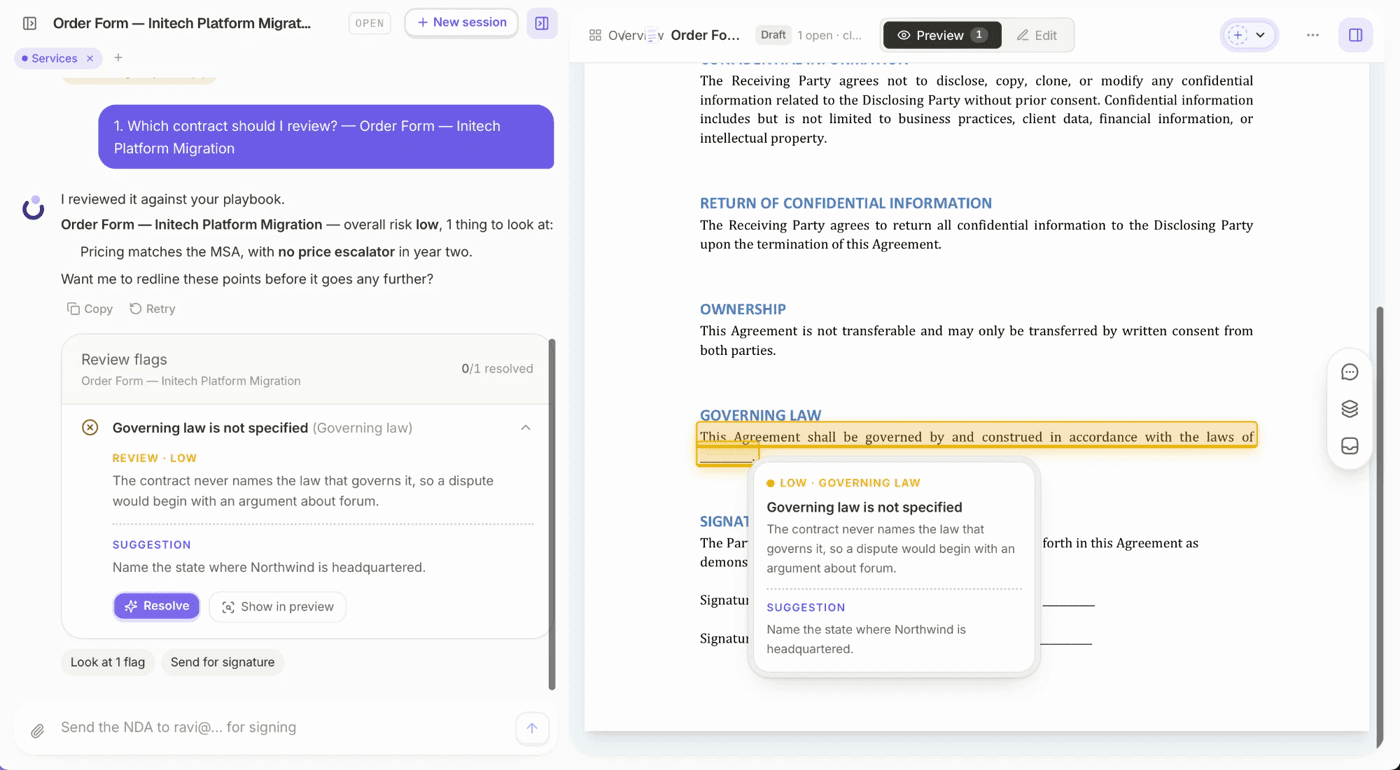
4. Resolve the Flags Instantly
Finding an issue and fixing it are two different jobs, and the second one is usually where the time goes.
Dottr resolves a flag for you. It makes the edit in the document, shows you what changed as a tracked change, and waits. You read it and approve it, or you do not. The work of rewriting the clause, matching the contract's own language and putting it back in the right place is already done by the time you look.
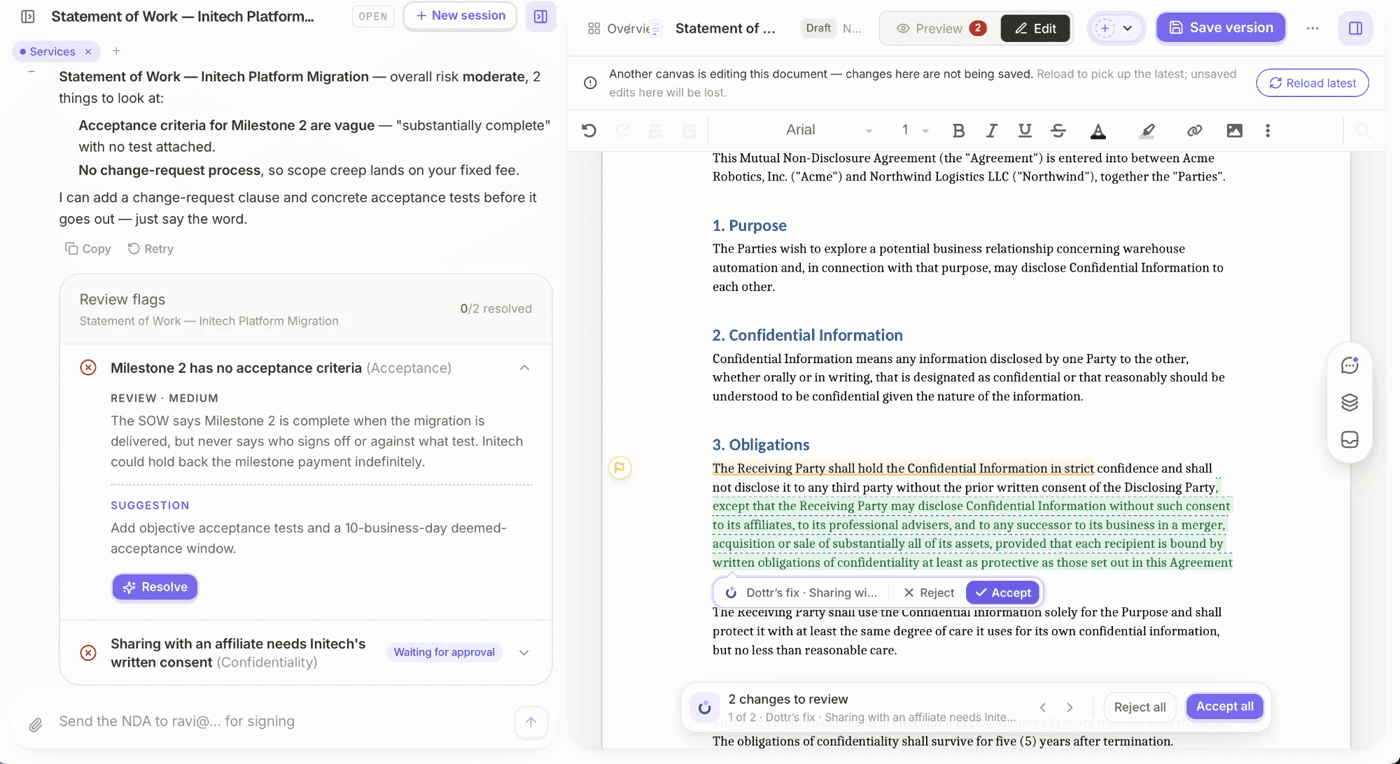
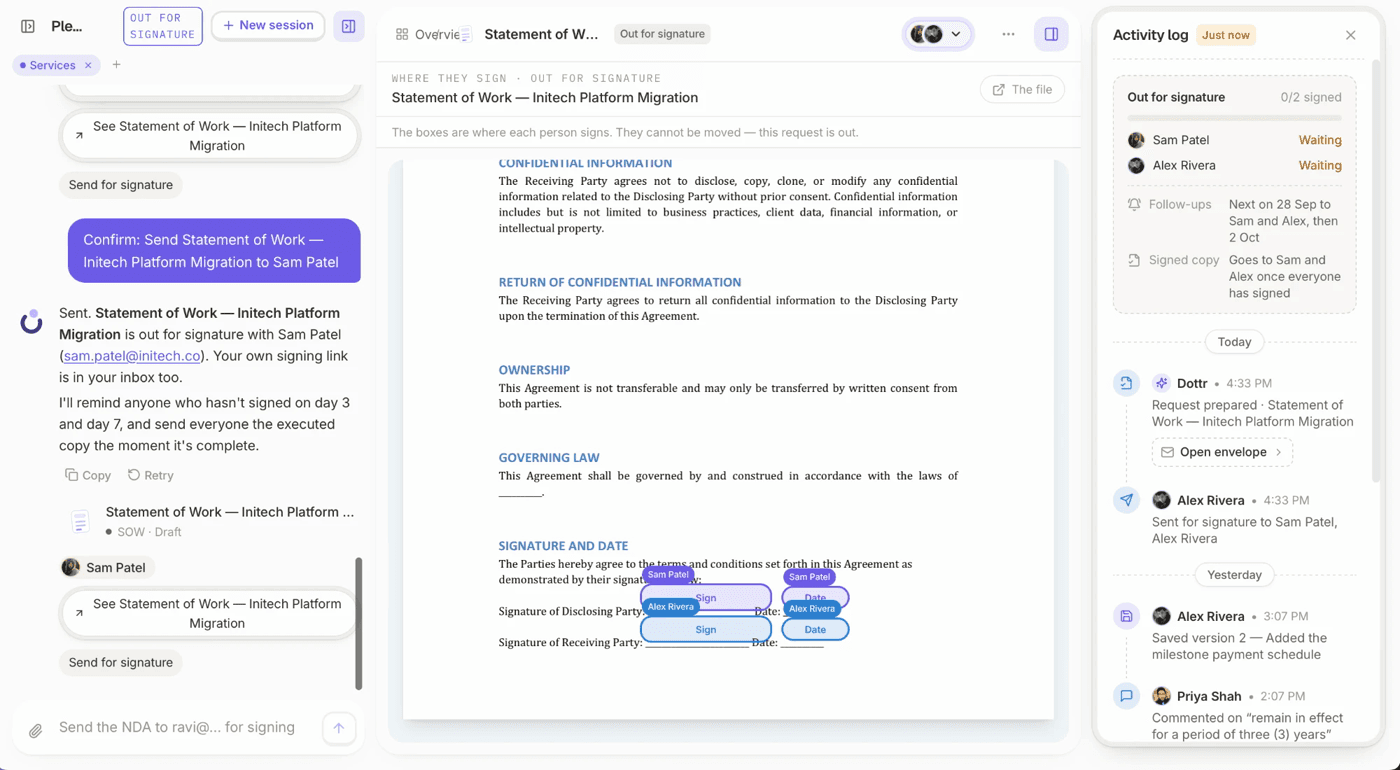
5. Move the Contract Toward Signature
Once the contract is ready, the next step is to prepare the final version, identify the right signers, and send it for execution.
Rather than treating this as a completely separate process, Dottr helps carry the contract forward from review into signing.
6. Follow Up Until the Contract Is Signed
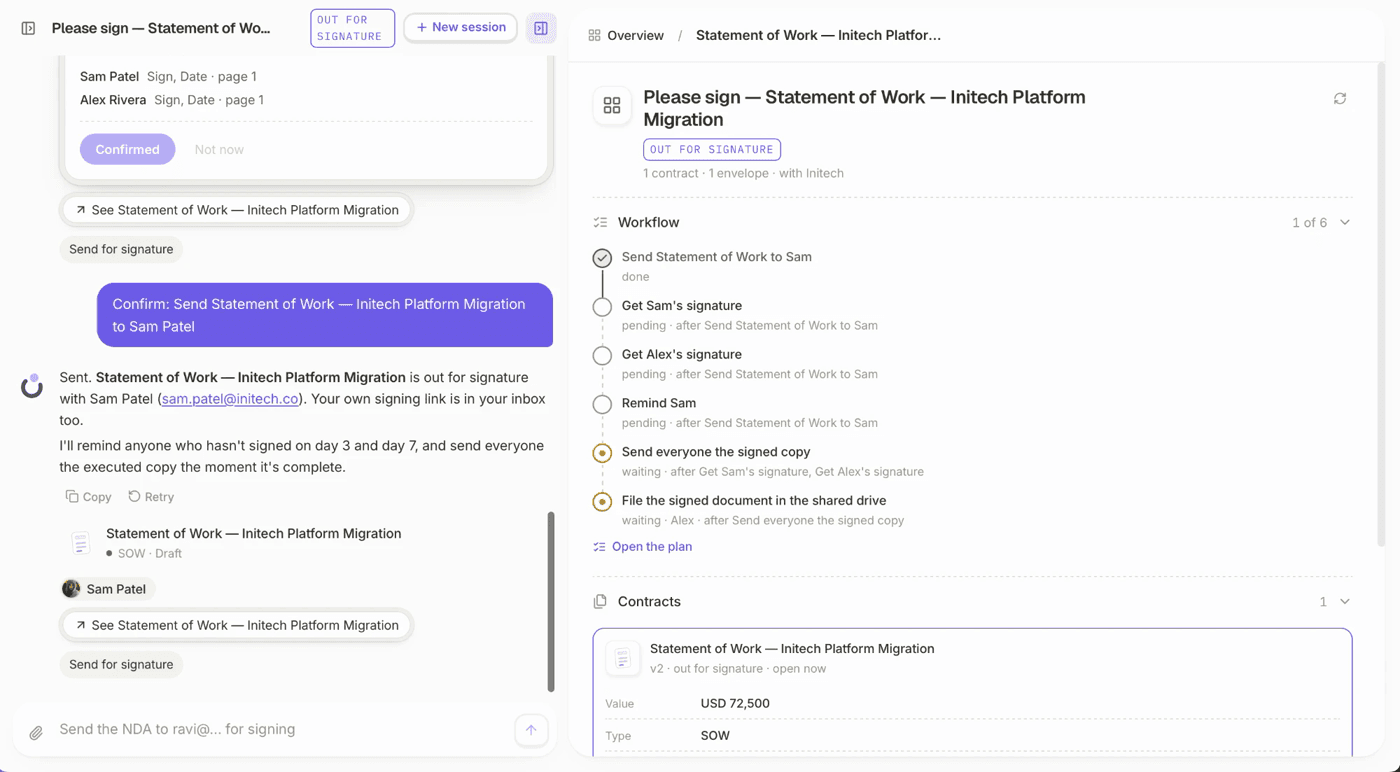
A contract is not complete just because it has been sent.
Dottr can help keep track of contracts that are still awaiting signature and follow up on agreements that have not yet been completed.
7. Keep the Contract Accessible After Signing
Once the agreement is signed, the contract and its related information remain part of a searchable contract record. This makes it easier to find the agreement later and refer back to its history when questions come up.
Review the Contract. Then Move It Forward
AI can make contract review faster. It can help you understand an agreement, identify important terms, and focus your attention on issues that may need action.
But a contract review is only one step in the job.
The contract still needs to move from review to a final version, through signing, and into a record you can find and use later. For small businesses, managing those steps across emails, documents, e-signature tools, and spreadsheets can create more work than expected.
That is where an AI-powered contract management system like Dottr comes in. Dottr is designed to connect the work around the contract, from reviewing it against your standards to moving it toward signing and keeping the agreement accessible afterward.
The goal is not just to use AI to review a contract. It is to have an AI teammate for contracts that helps take the work forward from review to signing and beyond.
Try it on a real contract
CC Dottr on the next one that lands.
It comes back reviewed against your playbook, with every risk flagged in plain English, and then it chases the signatures for you.