GetAccept vs Dottr (2026): Deal Rooms vs an AI Contract Teammate
Compare GetAccept vs Dottr in 2026. Explore digital sales rooms, AI contract review, redlining, and signing workflows to find the right fit.

A deal room can help a sales team share proposals, engage buyers, and track progress. But getting a deal over the line can still involve contract work that happens elsewhere: reviewing clauses, negotiating changes, and checking the final version before it goes for signature.
That gap is costly. A 2024 report by Deloitte and Docusign found that companies with disconnected agreement management workflows spend an extra 18% of their time working on agreements. For a small business without a dedicated legal team, that time comes out of a founder's or sales lead's week.
GetAccept and Dottr address different parts of this process. GetAccept focuses on sales engagement, digital sales rooms, and deal execution. Dottr acts as an AI contract teammate, helping teams draft agreements, review risks, manage redlines, and move contracts toward signature through an email-first workflow.
If you're considering a GetAccept alternative, the key question is whether your biggest bottleneck is engaging buyers or getting contracts reviewed, negotiated, and signed.
Key takeaways
- GetAccept focuses on sales engagement. Its digital sales rooms, proposal sharing, and buyer engagement tools help sales teams move deals forward.
- Dottr focuses on contract workflows. It helps small teams draft, review, negotiate, and sign contracts through an email-first workflow.
- Both support e-signatures. The main difference is the work each tool helps teams manage around the signing process.
- Dottr offers AI-assisted contract review: playbooks, prioritized risk flags, suggested edits, and tracked redlines to manage contract changes.
- GetAccept is priced per seat. Dottr is priced per contract, with unlimited users, e-signature included, and your first five contracts free.
- Choose based on your biggest bottleneck. GetAccept suits teams prioritizing buyer engagement, while Dottr is worth considering when contract review and negotiation slow deals down.
What Is GetAccept?
GetAccept is a sales enablement platform that helps teams share sales materials, engage buyers, and move deals toward closing. It combines digital sales rooms, proposal management, document tracking, and e-signatures so sales teams can manage key parts of the buyer journey in one place.
Key Features
- Digital sales rooms and buyer engagement: Give buyers a central place to review sales materials and collaborate with the sales team.
- Proposals and document tracking: Share proposals and other sales documents, then track buyer engagement to understand how deals are progressing.
- E-signatures and signing workflows: Send agreements for signature, manage recipients, and monitor signing status.
Who Is GetAccept Best Suited For?
GetAccept is best suited for sales teams that need to present proposals, share deal materials, understand buyer engagement, and keep deals moving. It is particularly relevant when the main challenge is coordinating the sales process rather than reviewing contract language or negotiating legal terms.
What Is Dottr?
Dottr is an AI contract teammate that helps small businesses manage contracts from the first draft through review, negotiation, and signing. Instead of making teams start in a separate contract platform, Dottr works through email, where many contract discussions already happen.
Key Features
- Contract drafting: Draft agreements from email threads, call notes, briefs, and instructions.
- AI-powered contract review: Check contracts against built-in or custom playbooks, flag risks by severity, and explain issues in plain language.
- Editing and redlining: Apply suggested changes, incorporate negotiation feedback, and track edits with version comparisons.
- Approval and signing workflows: Route contracts to reviewers, approvers, and signers, then track progress and send follow-ups.
- Contract records and Q&A: Keep agreements, versions, and review history accessible. Ask questions about contracts and get answers with supporting references.
Who Is Dottr Best Suited For?
Dottr is best suited for small businesses that handle contracts without dedicated legal or contract operations teams. It can help founders, sales leads, and operations managers review terms, resolve contract changes, coordinate signing, and keep agreements organized without managing every step manually. Teams can start by forwarding a contract email or CCing dottr@dottr.io on an existing thread.
GetAccept vs Dottr: Feature Comparison
GetAccept and Dottr both support electronic signatures, but they focus on different parts of the deal process. GetAccept helps sales teams share proposals, engage buyers, and track deal progress. Dottr focuses on the contract work that happens around signing, including drafting, risk review, negotiation changes, and contract records.
| Capability | Dottr | GetAccept |
|---|---|---|
| Built for | Small teams without in-house legal who need contracts reviewed, negotiated, and signed | Sales teams presenting proposals and engaging buyers |
| Where the work happens | Your inbox: CC or forward the contract thread to dottr@dottr.io | The GetAccept app, deal rooms, and its CRM integrations |
| Digital sales rooms and buyer engagement | Not its focus | Yes, with collaboration and engagement tracking |
| Proposals, quotes, and sales content | Not its focus | Yes, with AI-assisted content creation |
| E-signatures | Yes, included in every contract, with an audit trail and certificate of completion | Yes |
| Draft contracts from email threads or call notes | Yes, from scratch or on your own template | Contract templates and AI-generated sales content |
| AI contract risk review | Yes, with ranked risk flags and plain-English explanations | AI extracts contract data and key terms; clause-level risk review is not a core capability |
| Review against company playbooks | Yes, using built-in or custom playbooks | Templates and conditional content, not playbook-based review |
| Apply suggested fixes into a new version | Yes, the fix is written into the clause as a tracked change | Edit the document yourself, with real-time collaboration |
| Tracked redlines and version comparison | Yes, with redlines labeled by origin and version comparison | Comments, collaboration, and version history |
| Approval and signing workflows | Yes, with reviewer, approver, and signer roles | Yes, including contract workflows |
| Automated reminders and follow-ups | Yes, on your cadence until the last signer is done | Yes |
| Sign by replying to an email | Yes, signers can reply with their full name | Signing link |
| Contract records and Q&A | Every contract searchable, with answers that cite the clause | AI contract management, sold as an add-on |
| Human lawyer review | Request a fixed-price review by a real lawyer on any contract | Not offered |
| Pricing model | Per contract: first 5 free, then $1 a contract with everything included | Per seat: $25 a month (eSign) or $49 (Professional, five-seat minimum) |
| Users | Unlimited, never billed | Every seat is billed |
GetAccept prices are the per-user monthly list prices for its eSign and Professional plans as reported in 2026; Enterprise is quoted, and AI contract management and some integrations are add-ons. Check getaccept.com for current pricing.
GetAccept is a strong fit for teams that want to connect buyer engagement, sales content, and contract management. Dottr helps small teams understand contract risks, apply changes, and manage negotiations through signing.
The Real Difference: Deal Rooms vs an AI Contract Teammate
The difference between GetAccept and Dottr depends on where your team needs the most help.
GetAccept helps sales teams keep buyers engaged. A digital sales room gives prospects a central place to review proposals and sales materials, while engagement tracking helps sales reps understand buyer activity and decide when to follow up. The focus is on keeping the deal moving.
Dottr focuses on the contract itself. When a customer sends an agreement, a team may need to check risky clauses, compare terms with its playbook, negotiate changes, and prepare the final version for signing. Dottr helps with this work through an email-first workflow, so teams can review and update contracts without managing every step manually.

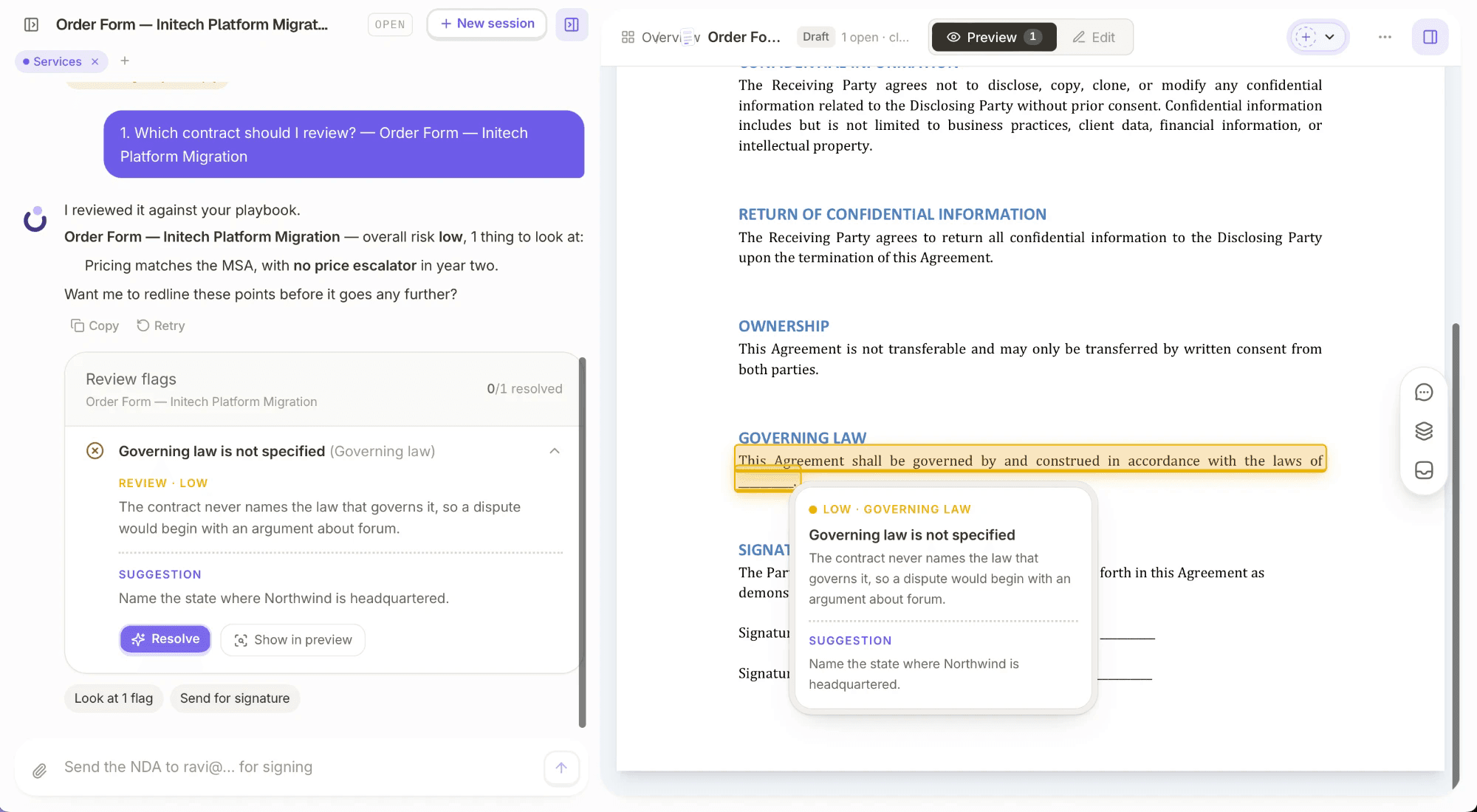
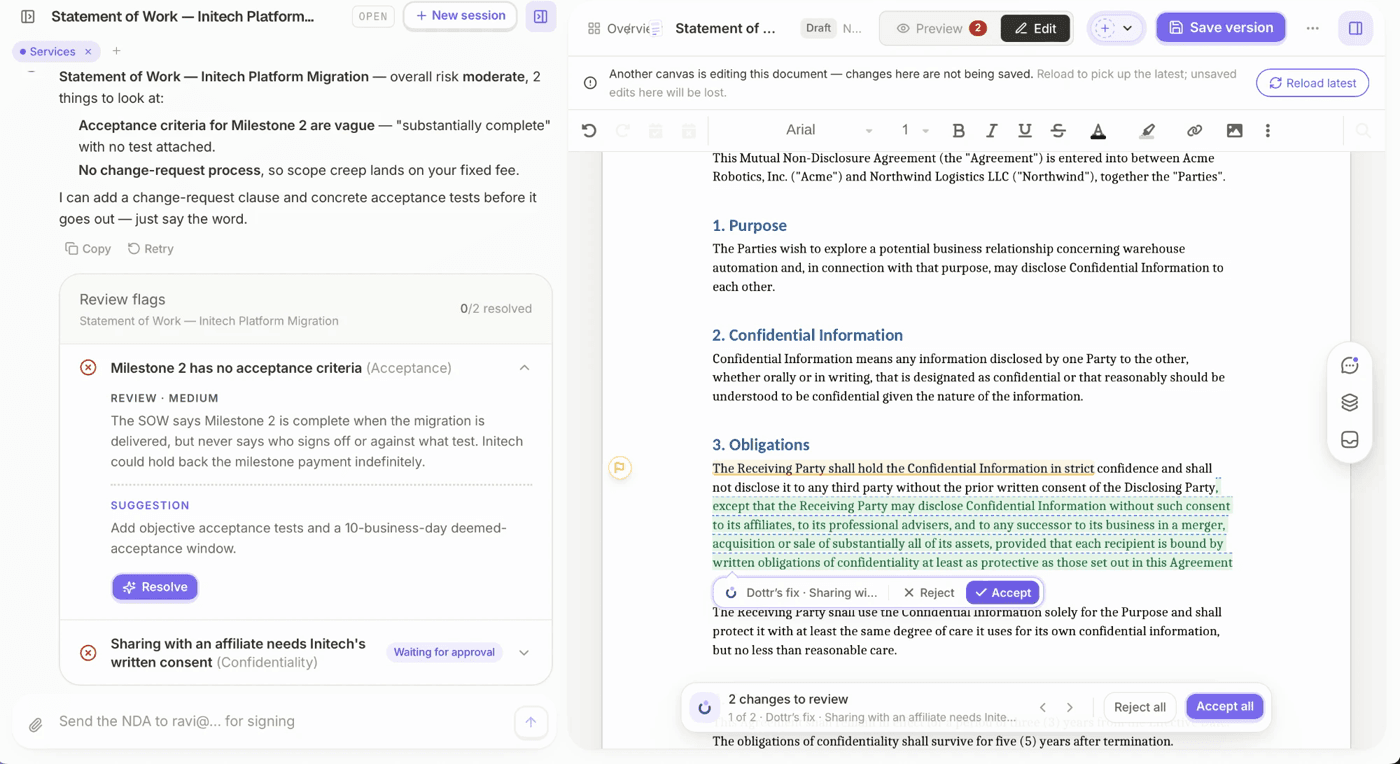
When a flag needs fixing, Dottr writes the replacement wording into the exact clause as a tracked change the other side can accept or reject, and every negotiation round comes back with what moved.

Read our guide to AI contract review for small businesses for a closer look at what to check before approving an agreement.
The two tools therefore solve different problems. If your main challenge is buyer engagement and sales coordination, GetAccept is the more relevant fit. If contract review and negotiation are slowing deals down, consider Dottr as an alternative to GetAccept.
When Should You Choose GetAccept or Dottr?
The right choice depends on what is slowing your team down. GetAccept focuses on sales engagement and buyer collaboration, while Dottr focuses on the contract work needed to move an agreement from review to signature.
| Your bottleneck | Better fit | Why |
|---|---|---|
| Buyers go quiet after the proposal | GetAccept | Deal rooms and engagement tracking show who is looking and when to follow up |
| Sales content is scattered across emails and decks | GetAccept | One room holds the proposal, materials, and conversation with the buyer |
| The customer sends back their own paper | Dottr | It reviews every clause against your playbook and flags the risks by severity |
| Negotiation drags on through rounds of edits | Dottr | Fixes go into the contract as tracked changes, with version comparison between rounds |
| Nobody on the team is a lawyer | Dottr | Plain-English explanations, and a fixed-price lawyer review when a contract needs one |
| Signed contracts are hard to find later | Dottr | Every contract is searchable, and answers cite the clause they came from |
Choose GetAccept If
- Buyer engagement is your priority. You need to share sales materials, present proposals, and collaborate with prospects.
- You need visibility into deal progress. Digital sales rooms and document tracking help your team understand buyer activity and follow up.
- Your contract process already works. Your team has a separate process for reviewing terms and negotiating changes, and you mainly need help managing the sales process and collecting signatures.
Choose Dottr If
- Contract review slows down deals. Your team needs help identifying risky clauses and understanding what needs to change before signing.
- Negotiations involve repeated edits. You want suggested fixes, tracked redlines, and version comparisons to help manage contract changes.
- Your team manages contracts through email. You need practical contract support without a dedicated legal team or a separate, manually coordinated workflow.
If your team already uses general-purpose AI to review agreements but still manages edits, signing, and follow-ups manually, see what ChatGPT can and cannot do when reviewing contracts.
Frequently Asked Questions
Yes, for the contract side of a deal. Dottr sends contracts for e-signature and chases signers like GetAccept does, and adds drafting, clause-level risk review against your playbook, tracked-change fixes, and a searchable contract record. It does not offer digital sales rooms, proposals, or buyer engagement tracking.
Yes. Some teams keep GetAccept for proposals and deal rooms, and CC Dottr when a customer sends back a contract with terms that need review or negotiation.
Yes. E-signature is included in every contract at no extra cost, however many people need to sign. Signers need no account: they can sign from a link or by replying to the email with their full name.
GetAccept is priced per user, with a five-seat minimum on its Professional plan. Dottr is priced per contract: your first five are free, then each contract is $1 with drafting, review, negotiation, signing, and download included, and users are never billed.
No. Dottr is not a law firm and does not provide legal advice. It helps you understand contracts, identify common risks, and prepare the changes you want to make. When a contract needs a lawyer, you can request a fixed-price review by a real one.
Conclusion: Choose the Tool That Solves Your Bottleneck
GetAccept helps sales teams engage buyers, share proposals, and move deals forward. Dottr helps small teams manage contract drafting, risk review, negotiation, and signing.
If your sales process works but contract review and negotiation are slowing deals down, Dottr is worth considering as a GetAccept alternative. Its email-first workflow brings AI-assisted contract support into the process without requiring a dedicated legal or contract operations team.
Need more than a deal room? Let Dottr help your team review contract risks, manage redlines, and move agreements toward signature. Start by emailing your contract to dottr@dottr.io.
Try it on a real contract
CC Dottr on the next one that lands.
It comes back reviewed against your playbook, with every risk flagged in plain English, and then it chases the signatures for you.