Dottr vs Docusign: E-Signature vs Yes-to-Signed Contracts
Compare Dottr vs Docusign for contract review, redlining, e-signatures, and follow-ups. Find the right fit for your small business.

Getting a contract signed is only one part of managing it. Before a signature, someone may need to draft the agreement, review its terms, negotiate changes, check the final version, and confirm who needs to sign. After sending it, the team still needs to track progress and follow up if the contract remains unsigned.
For small businesses without a dedicated legal or contract operations team, these tasks often fall to a founder, sales lead, or operations manager. Handling them across separate tools can create extra handoffs and make it harder to keep track of changes.
Docusign and Dottr take different approaches to contract work. Docusign is best known for electronic signatures, with broader agreement management capabilities available through its other offerings. Dottr brings AI-powered drafting, contract review, editing, redlining, signing, and document retrieval into an email-first workflow. Teams can involve Dottr by forwarding or copying it on a contract email, then use it to move the agreement through the next steps.
If you're looking for a Docusign alternative for small business, the decision comes down to the work you need help with: collecting signatures on a ready-to-sign agreement, or managing more of the process that gets a contract from initial draft to signed document.
Key takeaways
- Docusign is a strong fit for businesses that primarily need to send agreements for electronic signature and track completion.
- Dottr helps small teams manage more of the contract process, from AI-powered drafting and risk review to redlining, signing, and record-keeping.
- Contract review capabilities differ: Docusign offers broader agreement management and AI features through offerings such as Intelligent Agreement Management (IAM), while Dottr brings review and editing into an email-first workflow.
- Dottr works from email. Teams can forward a contract or CC dottr@dottr.io to start working on it.
- Docusign is priced per seat with an envelope allowance. Dottr is priced per contract, with unlimited users, e-signature included, and your first five contracts free.
- The right choice depends on your workflow: whether you mainly need e-signatures, or support across more stages of the contract lifecycle.
What Is Dottr?
Dottr is an AI teammate that helps small businesses manage contracts from drafting and review through signing and record-keeping. It brings these tasks into one workflow, reducing the need to move between separate tools or manually coordinate each step.
What Dottr Is Built For
Dottr is designed for teams that handle contracts without dedicated legal or contract operations support. It can draft agreements from email conversations, call notes, or instructions; review terms for risks; suggest changes; and help teams resolve issues through editing and redlining.
Once a contract is ready, Dottr can prepare it for signing, route it to the right people, track its status, and send reminders. Signed agreements remain accessible for future reference, with AI-powered search and document Q&A.
Where the Work Starts
Dottr works directly from email, where many small-business contract discussions already happen. Teams can forward an agreement or CC dottr@dottr.io on an email thread to get started.
Dottr reads the conversation and attached documents, identifies the next task, and helps move the contract forward. For example, a team can ask Dottr to review an agreement, apply suggested edits, obtain approval, or prepare it for signing without starting a separate workflow from scratch.
What Is Docusign?
Docusign is an electronic signature platform that helps businesses send agreements for signature, collect signed documents, and manage the signing process. Its broader agreement management offerings also support parts of the contract lifecycle, including review, workflows, and agreement search.
What Docusign Is Built to Do
Docusign is built primarily to make agreements easier to send, sign, and track. Teams can upload a document, add recipients and signature fields, set the signing order, and send it for electronic signature. They can then monitor progress and access the completed agreement.
Beyond e-signatures, Docusign offers AI-powered contract review and broader agreement management features through its Intelligent Agreement Management (IAM) offering, available on separate products and plans.
Where the Work Starts
In a typical e-signature workflow, Docusign comes in when an agreement is ready to be sent for signing. Someone prepares the final document, confirms the signers, configures the signing process, and sends it through the platform.
The work leading up to that point may include drafting terms, reviewing risks, negotiating redlines, and confirming the final version. How much of that work Docusign supports depends on the products and features a business uses. For teams that primarily need to send ready-to-sign agreements and collect signatures, its e-signature workflow may be sufficient.
Dottr vs Docusign: Side-by-Side Comparison
Both Docusign and Dottr support electronic signatures, but they approach contract workflows differently. Docusign focuses on e-signatures and offers broader agreement management through products like IAM. Dottr connects contract review, negotiation changes, signing, follow-ups, and record-keeping in one AI-assisted workflow.
The practical difference is how much of the contract process you want one tool to handle.
| What you need | Dottr | Docusign |
|---|---|---|
| Built for | Small teams without in-house legal who need contracts reviewed, signed, and tracked | Businesses sending ready-to-sign agreements for electronic signature |
| Where the work starts | Your inbox: CC or forward the contract thread to dottr@dottr.io | Upload the final document to Docusign and configure the envelope |
| Send a contract for signature | Yes | Yes |
| Capture electronic signatures | Yes, included in every contract, with an audit trail and certificate of completion | Yes |
| Contract drafting | Drafts from email threads, call notes, or a sentence, from scratch or on your own template | Templates for documents you send repeatedly |
| Review contracts for risk | Yes, with prioritized risk flags and plain-English explanations | Available through IAM |
| Review against a company playbook | Yes, using preset or custom playbooks | AI-assisted playbook review through IAM |
| Understand flagged risks | Explains what a clause means and suggests replacement language | AI review capabilities vary by offering |
| Prioritize contract risks | Yes, with critical, high, medium, and low severity levels | Depends on the review capability used |
| Apply suggested changes | Apply suggested language as edits and save a new version | Depends on the product and workflow |
| Incorporate negotiation changes | Make changes through plain-language instructions and tracked redlines | Depends on the editing and agreement workflow used |
| Review and accept or reject redlines | Yes, with redlines labeled by origin | Available capabilities depend on the product |
| Compare contract versions | Yes, see exactly what changed between versions | Available through relevant agreement management capabilities |
| Route for review, approval, and signing | Yes, with assigned roles for reviewers, approvers, signers, and final-copy recipients | Workflow capabilities depend on the product and plan |
| Configure signing order | Yes, serial or parallel signing | Yes |
| Correct signing details after sending | Replace a signer's email, cancel a signer, or void or recall the signing request | Options depend on the plan and signing status |
| Follow up on unsigned contracts | Automated reminders and follow-ups within the contract workflow | Signing-status tracking and reminders |
| Sign without creating an account | Yes, by signing link or by replying to the invitation email with their full name | Signers don't need an account; options depend on sender settings |
| Maintain a contract record | Keeps the contract, versions, findings, and activity history accessible | Agreement storage and management depend on the product |
| Search and ask questions across contracts | Yes, with cited answers that link to the clause | Agreement search through IAM |
| Human lawyer review | Request a fixed-price review by a real lawyer on any contract | Not offered |
| Pricing model | Per contract: first 5 free, then $1 a contract with everything included | Per seat: $10 to $40 a user a month on annual plans paid upfront, with an envelope cap on every eSignature plan |
| Users | Unlimited, never billed | Every sender seat is billed |
Docusign's eSignature plans are billed per user: Personal, Standard, and Business Pro cost $10, $25, and $40 a user a month on an annual plan paid upfront, or $11, $30, and $45 on an annual plan paid monthly. Personal is capped at 5 envelopes a month, and Standard and Business Pro include 100 envelopes per user a year on annual plans. IAM plans include eSignature and are priced separately. These are the list prices on docusign.com, checked in October 2026.
The key difference: what happens between review and signature
Docusign offers e-signatures alongside broader agreement management through IAM. Dottr takes an email-first approach designed for small teams that want to manage contract work without coordinating every step manually.
The choice depends on your existing process, the features included in your chosen plan, and whether you need a signing tool or a more connected way to manage contracts.
The Gap Between "Ready to Sign" and "Signed"
Agreeing on contract terms does not mean the document is ready to send. The team may still need to resolve review comments, incorporate negotiated changes, check the latest version, confirm the signer, and secure final approval.
What Still Happens Before Signature
These steps often involve several people and tools. A missed edit or outdated version can trigger another round of review and delay the agreement.
What Still Happens After Sending
Sending the contract does not guarantee completion. Someone may still need to follow up with signers, identify what is holding up progress, confirm the correct version was sent, and organize the executed agreement.
The result is extra coordination between agreeing on terms and getting the final contract signed. Here is who carries each step.
| Step | With Dottr | With an e-signature tool alone |
|---|---|---|
| Resolve review comments | Dottr flags each risk and writes the fix into the clause as a tracked change | Someone on your team reads the contract and edits it by hand |
| Incorporate negotiated changes | Ask in plain language and Dottr applies the edits as redlines | Edited in Word or another tool, then re-uploaded |
| Confirm the latest version | Compare any two versions inside the contract record | Checked manually across email attachments |
| Secure final approval | Approvers are part of the route, before anyone signs | Collected separately, over email or chat |
| Follow up with signers | Reminders on your cadence until the last signer is done | Reminders, plus manual chasing for stalled envelopes |
| Organize the executed agreement | Filed with its versions, findings, and activity history | Stored as a completed envelope |
How Dottr Takes a Contract From Yes to Signed
Dottr connects contract review, negotiation, signing, and follow-up in one workflow. Here's how it works.
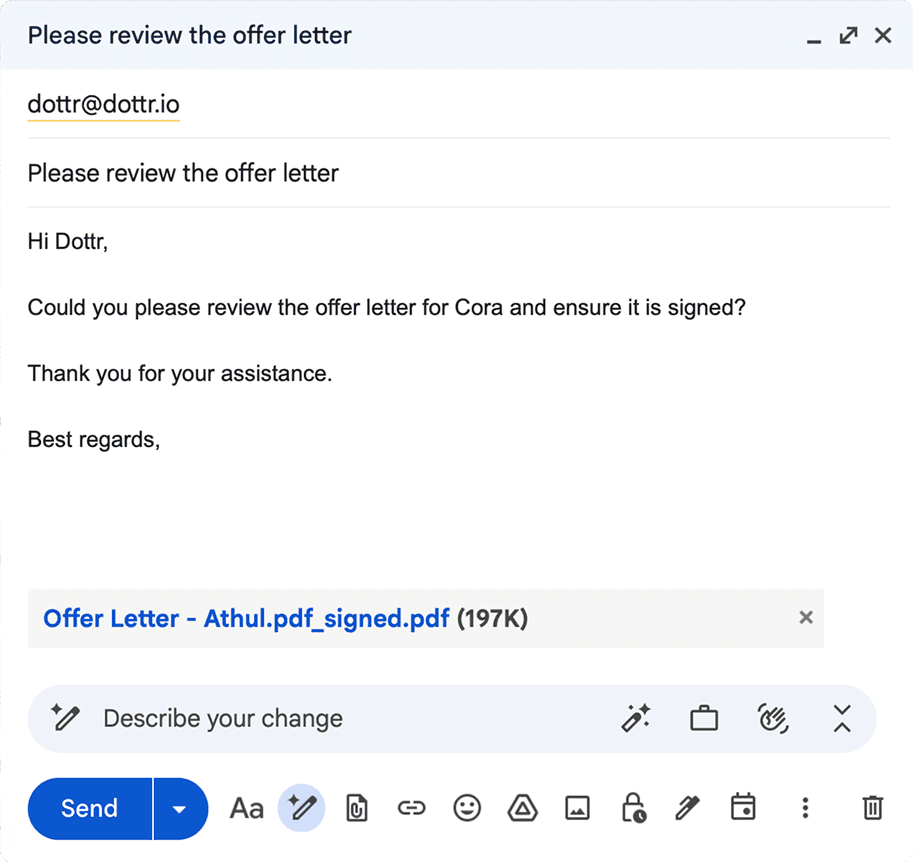
1. Bring the Contract Into Dottr
Forward a contract email or CC dottr@dottr.io on the thread. Dottr reads the conversation and attached documents to understand the contract and the next task.

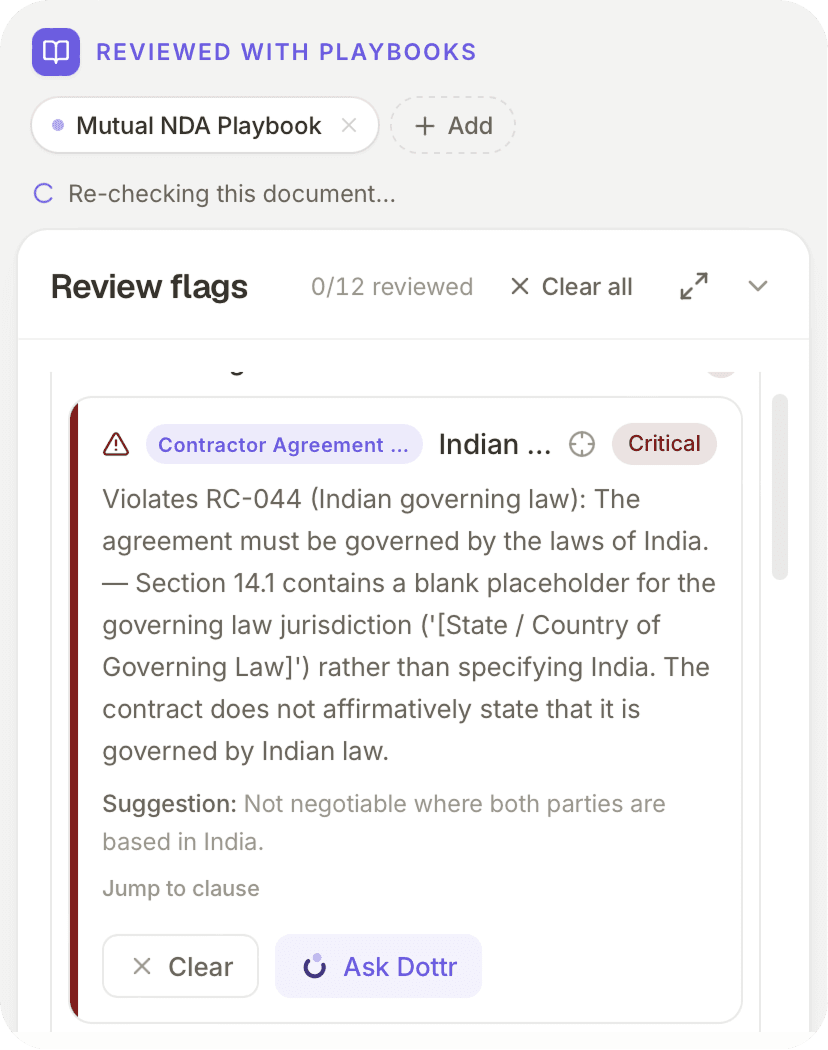
2. Review Against Your Standards
Dottr checks the contract against a relevant playbook and flags risks by severity. Each finding includes a plain-English explanation and suggested replacement language.

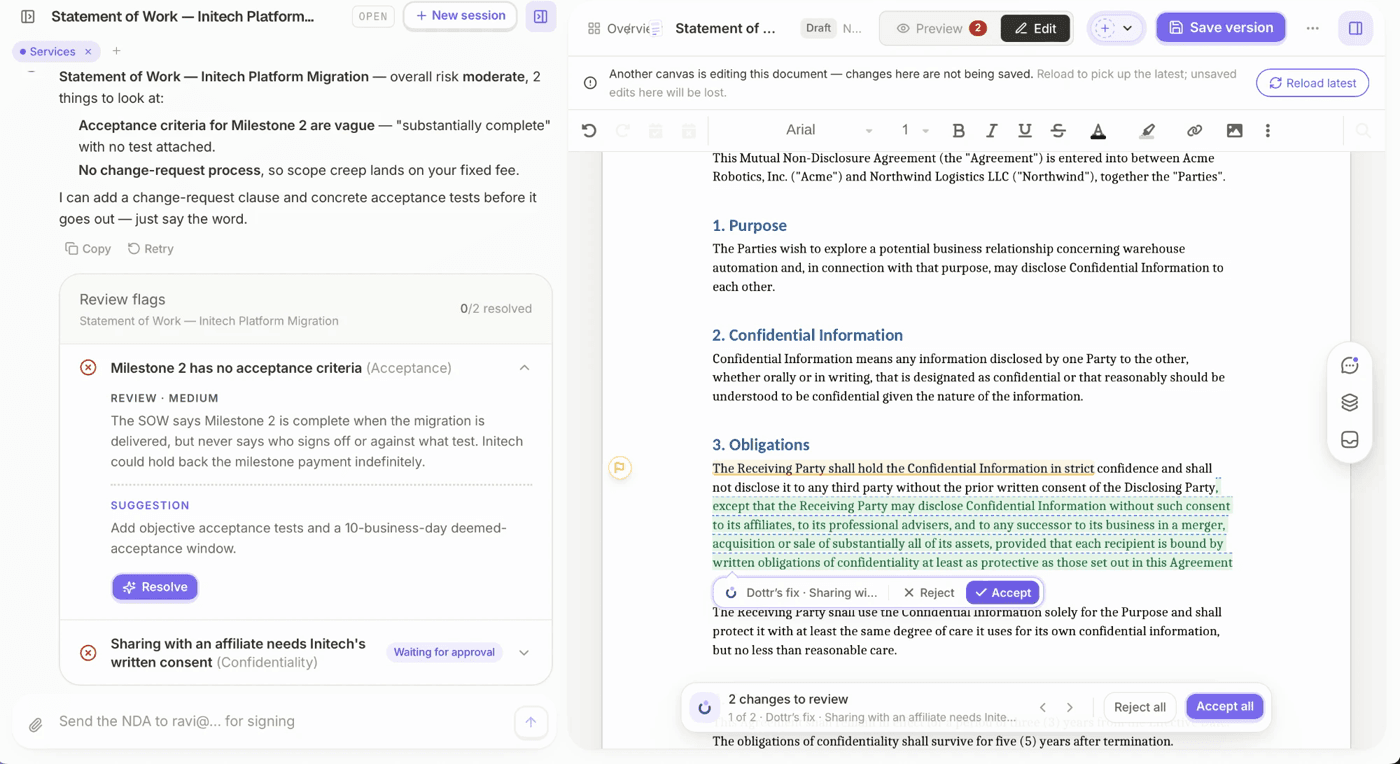
3. Make Changes and Resolve Issues
Apply suggested edits, incorporate negotiated changes through plain-language instructions, and review tracked redlines. Compare versions to confirm what changed before moving ahead.

4. Route for Approval and Signing
Move the contract through review, approval, and signing, assigning each person a role. Prepare the signing document, set the signing order, and send it when ready.

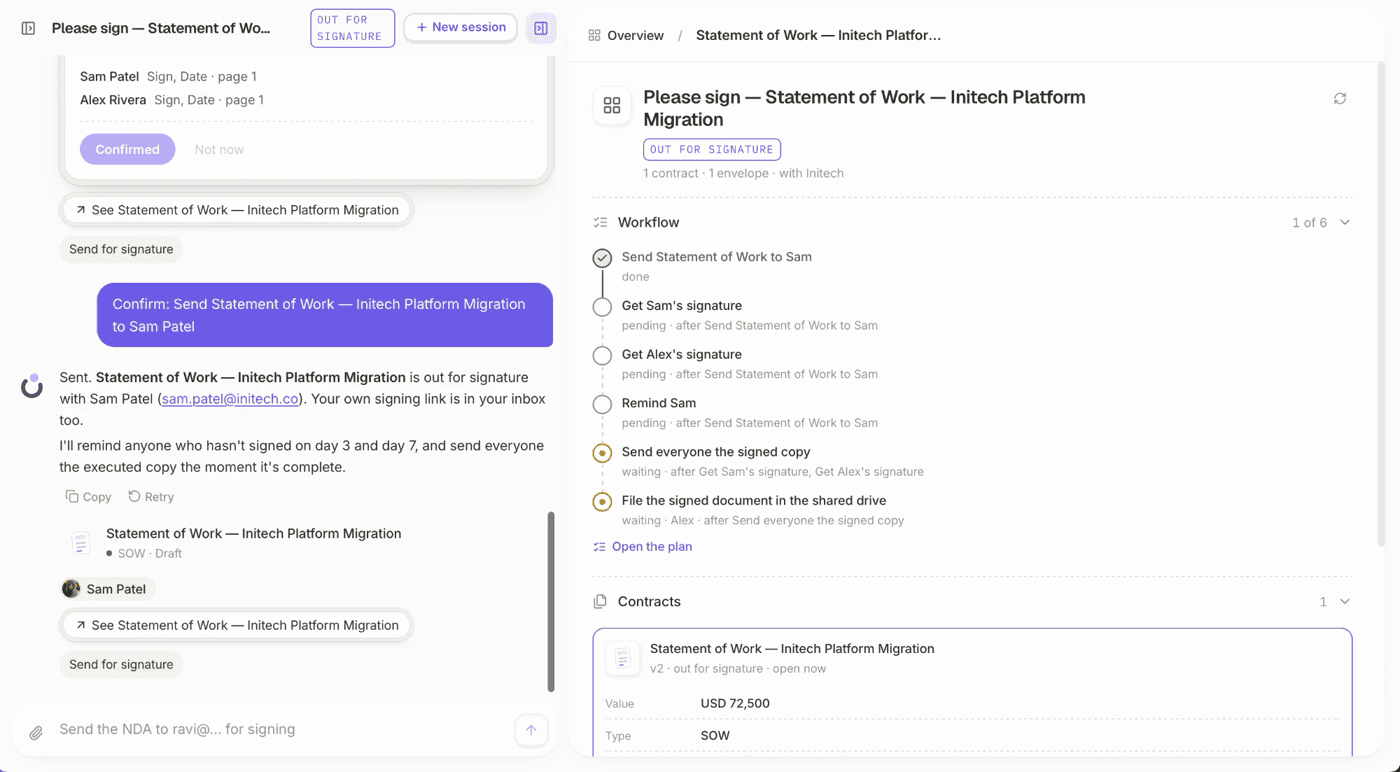
5. Follow Up Until It's Signed
Dottr tracks signing progress and sends reminders when signers don't respond. Teams can check the contract's status instead of managing follow-ups separately.
6. Keep the Final Contract Accessible
Once signed, the agreement and its activity history remain accessible in Dottr. Teams can search contract records and ask questions about documents, with cited answers to help locate relevant information.
When Should a Small Business Choose Docusign?
Docusign may be the better fit when your business primarily needs to send agreements for electronic signature and your existing contract process works well. Choose Docusign if:
- Your contracts are already reviewed and approved. You mainly need to send the final version for signature.
- E-signatures are your primary requirement. You want a straightforward way to prepare, send, and track signing requests.
- Your review process already works. Your team has a reliable way to handle contract drafting, risk review, negotiation, and approvals.
- You don't need a connected AI contract workflow. You prefer to manage review and negotiation separately from signing.
For businesses that already have these steps covered, Docusign can handle the signature stage without requiring a change to the broader contract process.
When Is Dottr a Better Docusign Alternative?
Dottr may be a better fit for small businesses that need help with more than collecting signatures. It connects contract review, negotiation, signing, and record-keeping in one workflow, making it useful for teams without dedicated legal or contract operations support. Consider Dottr if:
- Your team lacks dedicated legal support. You need help reviewing contracts and identifying risks without relying on manual reviews for every agreement.
- Contracts arrive through email. You want to start a review by forwarding a contract or CCing Dottr on the existing thread.
- You need to resolve contract issues, not just flag them. Dottr suggests replacement language and lets you apply edits, incorporate negotiated changes, and compare versions.
- Redlines and revisions are hard to track. You want to see what changed and review edits before sending the final version.
- Your team manages signature follow-ups manually. You want signing status and reminders connected to the contract workflow.
- You need company-specific review standards. Dottr can check agreements against preset or custom playbooks and learn from accepted or rejected clauses.
- You want a searchable contract record. Keep the agreement, versions, findings, and activity history accessible after signing.
- Some contracts need legal expertise. Dottr lets you request a review by a real lawyer when AI assistance is not enough.
Dottr is especially useful when the challenge is not simply getting a signature, but moving a contract from review and negotiation to approval, signing, and a record the team can refer to later.
For a closer look at what to check before signing, read our guide to AI contract review for small businesses, or use this contract review checklist.
Frequently Asked Questions
Yes, for small teams that want more than a signature. Dottr sends contracts for e-signature, tracks signers, and sends reminders like Docusign does, and adds drafting, clause-level risk review against your playbook, tracked-change fixes, version comparison, and a searchable contract record, all started from an email.
Yes. E-signature is included in every contract at no extra cost, however many people need to sign. Every signed document comes with an audit trail and a certificate of completion.
No. Signers can sign from a link, or by replying to the invitation email with their full name. Only the person sending the contract uses Dottr.
Yes. Some teams keep Docusign for signatures they already route through it and CC Dottr whenever a contract arrives that needs review, redlining, or negotiation before it is ready to sign.
Docusign eSignature is priced per user, with an envelope allowance on each plan. Dottr is priced per contract: your first five are free, then each contract is $1 with drafting, review, negotiation, signing, and download included, and users are never billed.
No. Dottr is not a law firm and does not provide legal advice. It helps you understand contracts, identify common risks, and prepare the changes you want to make. When a contract needs a lawyer, you can request a fixed-price review by a real one.
E-Signature Is One Step. Signed Is the Outcome.
Collecting signatures is important, but it is only one part of getting a contract across the finish line. Small businesses also need to review terms, resolve risks, incorporate negotiated changes, secure approvals, follow up with signers, and keep the final agreement accessible.
Docusign is a strong fit when your primary need is electronic signatures. Dottr goes further by connecting AI-powered contract review, editing, redlining, signing, follow-ups, and record-keeping in one workflow.
Need more than an e-signature? CC Dottr on your next contract at dottr@dottr.io and see how it can help move the agreement from review to signed.
Try it on a real contract
CC Dottr on the next one that lands.
It comes back reviewed against your playbook, with every risk flagged in plain English, and then it chases the signatures for you.